
At-Tuhfa: A gift shop,
end to end.
A gift shop’s storefront, and the point of sale and back office behind its counter.
Real screens from a demonstration shop: the At-Tuhfa catalogue and prices, with about 1,350 invoices across 90 days. The customers, staff and every figure are invented, and the storefront uses stock photography.

At-Tuhfa is a gift shop in Bangladesh: showpieces, attar, Islamic gifts, clocks, lamps and chocolates, with a gift bag to go with every present. Shoppers want to know what is on the shelves and what it costs. The people behind the counter want to sell quickly, keep the stock honest, chase what is owed and know, at the end of the month, what the shop actually earned. One project serves both.
- SECTOR
- Gift retail
- PLATFORM
- Storefront, point of sale and back office
- WE DID
- Design, frontend, backend, database and documentation
- ENGAGEMENT
- Build it
Find the gift,
then visit the shop.
The storefront answers the questions a gift buyer actually has. What do you have? What would suit a wedding, an Eid visit or a new baby? What can I get for ৳500? It is built phone-first, because that is where most shoppers will see it.
Visit the storefront
- By department
The shop’s categories grouped the way a shopper thinks, each with a “from” price, so nobody has to guess whether a section is in budget.
- By occasion
Eid and Ramadan, weddings, birthdays, little ones and a new home, for the shopper who has not decided yet.
- By budget
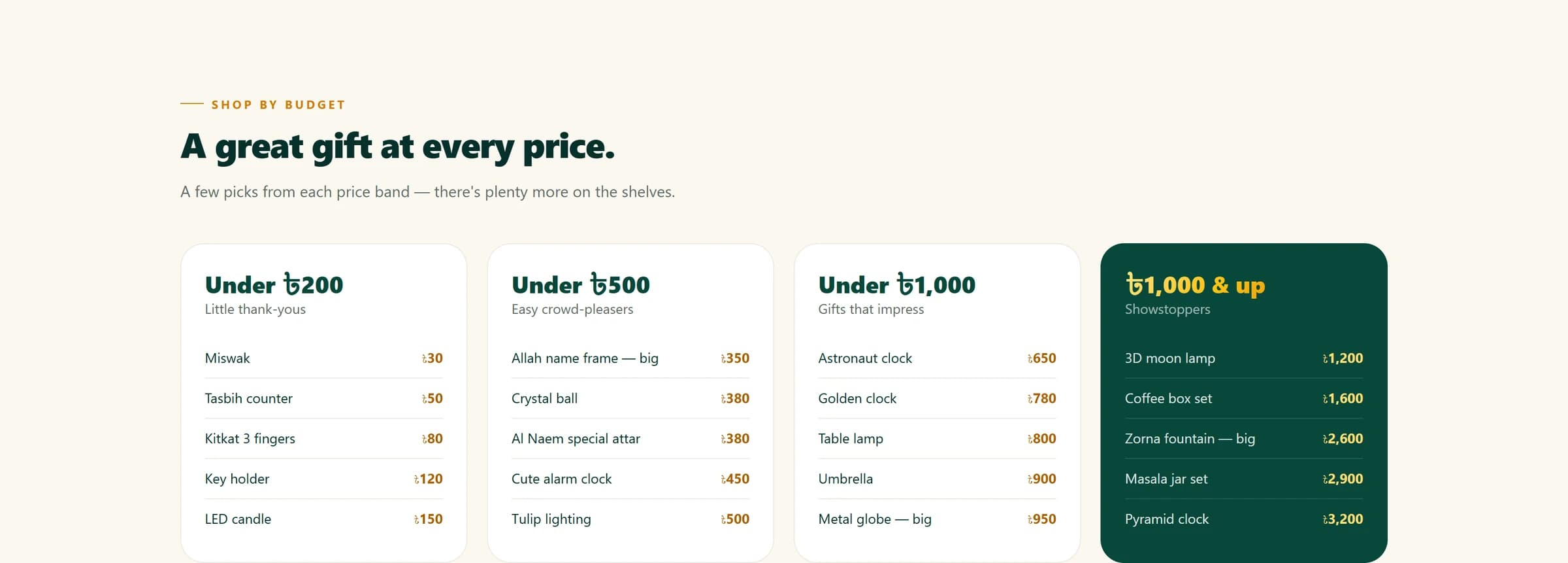
Picks under ৳200, ৳500 and ৳1,000, an Islamic corner of its own, and gift bags from ৳80 at the counter.
It is for discovery and a visit to the shop. Every word and price lives in one data file, so the page is fully static and keeps working even if the back office is down.
Takings are easy.
Profit is the hard part.
A shop owner can tell you today’s takings. Ask what the shop earned and the answer gets vague, because the honest version needs four things at once: what the goods cost, what went out on credit, what came back or broke, and what the month’s overheads were.
Those four numbers usually live in four different places: a cash drawer, a notebook, somebody’s memory and a shoebox of bills. At-Tuhfa’s back office keeps them in one system and does the subtraction, so the last line, the one the owner actually wanted, is on the screen without anybody reaching for a calculator.
At-Tuhfa
Profit after everything
- +Gross salesThe counter
- −ReturnsReturns
- =Net revenue
- −Cost of goodsPurchase batches
- =Gross profit
- −ExpensesExpenses
- =Operating profit
- −Stock written offRemovals
- =Net profit
Scan, sell, print.
Next customer.
The register is its own world: no sidebar, no dashboard chrome, nothing to click by accident during a queue.
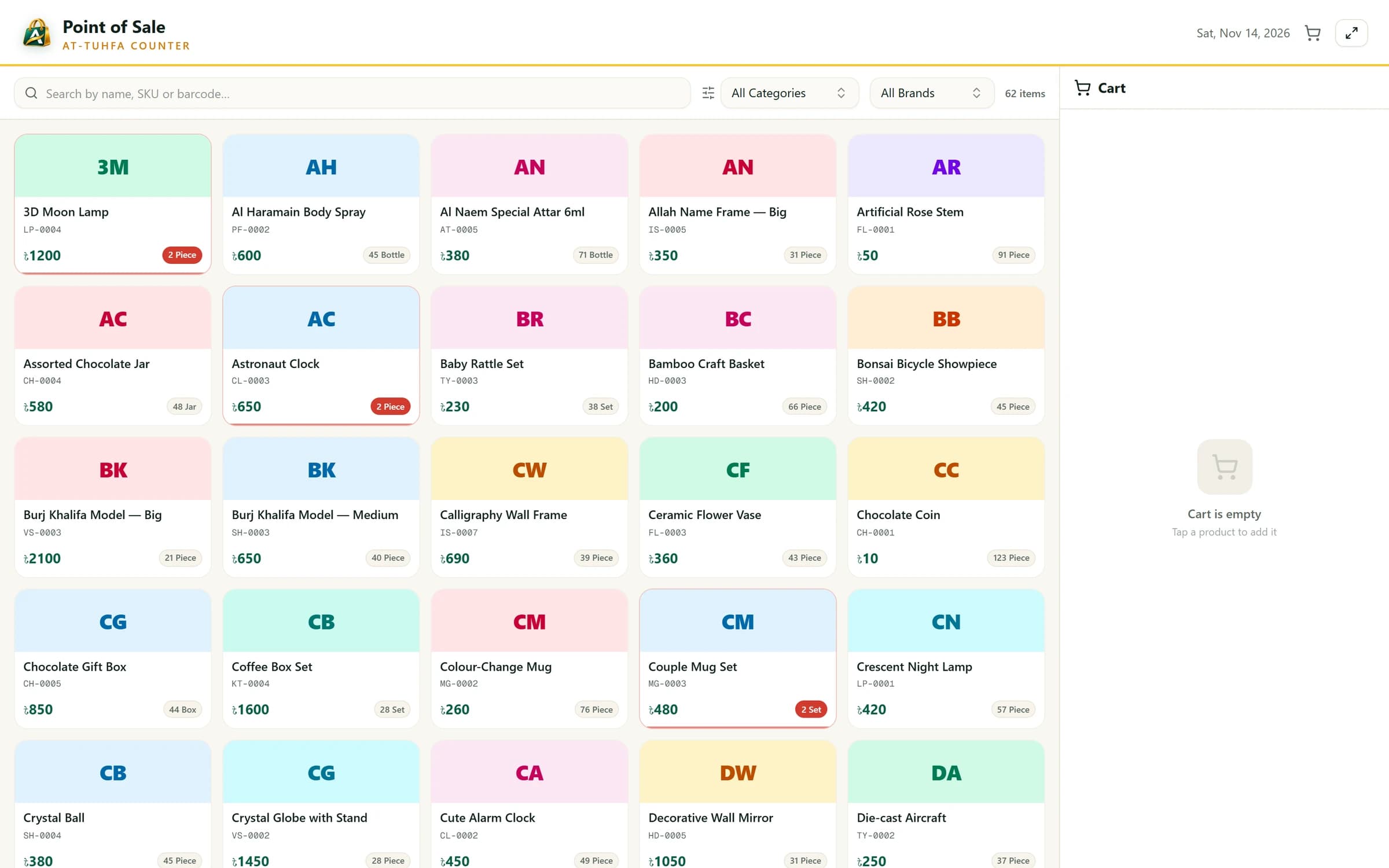
Search by name, SKU or barcode. A hardware scanner types into the same box, and the grid narrows to the product. Anything out of stock never appears, so a cashier cannot sell what is not there.
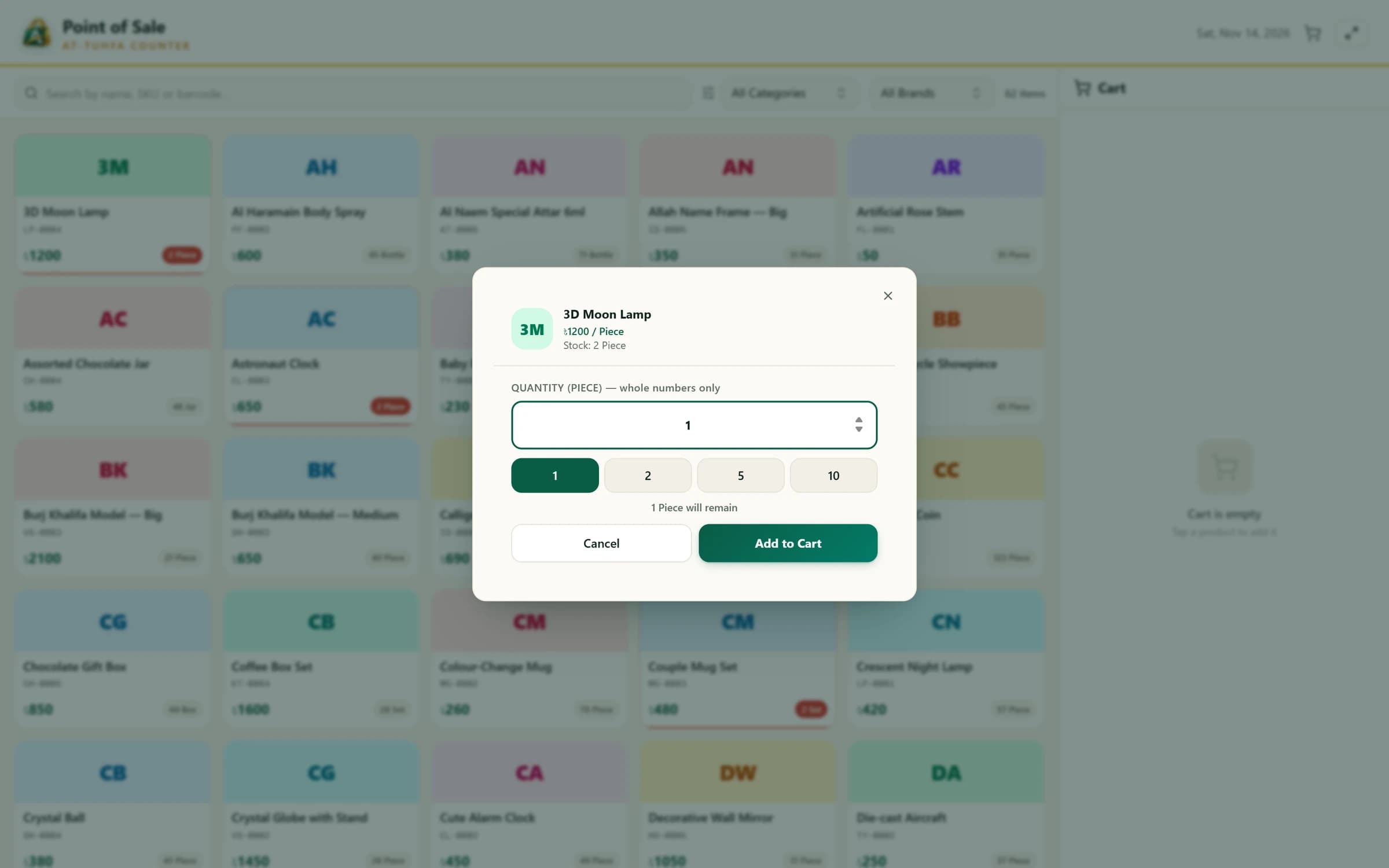
Quantity knows the unit. Nineteen units take whole numbers only, so nobody sells 1.5 clocks. Seven take decimals, which is how attar sells by the millilitre.
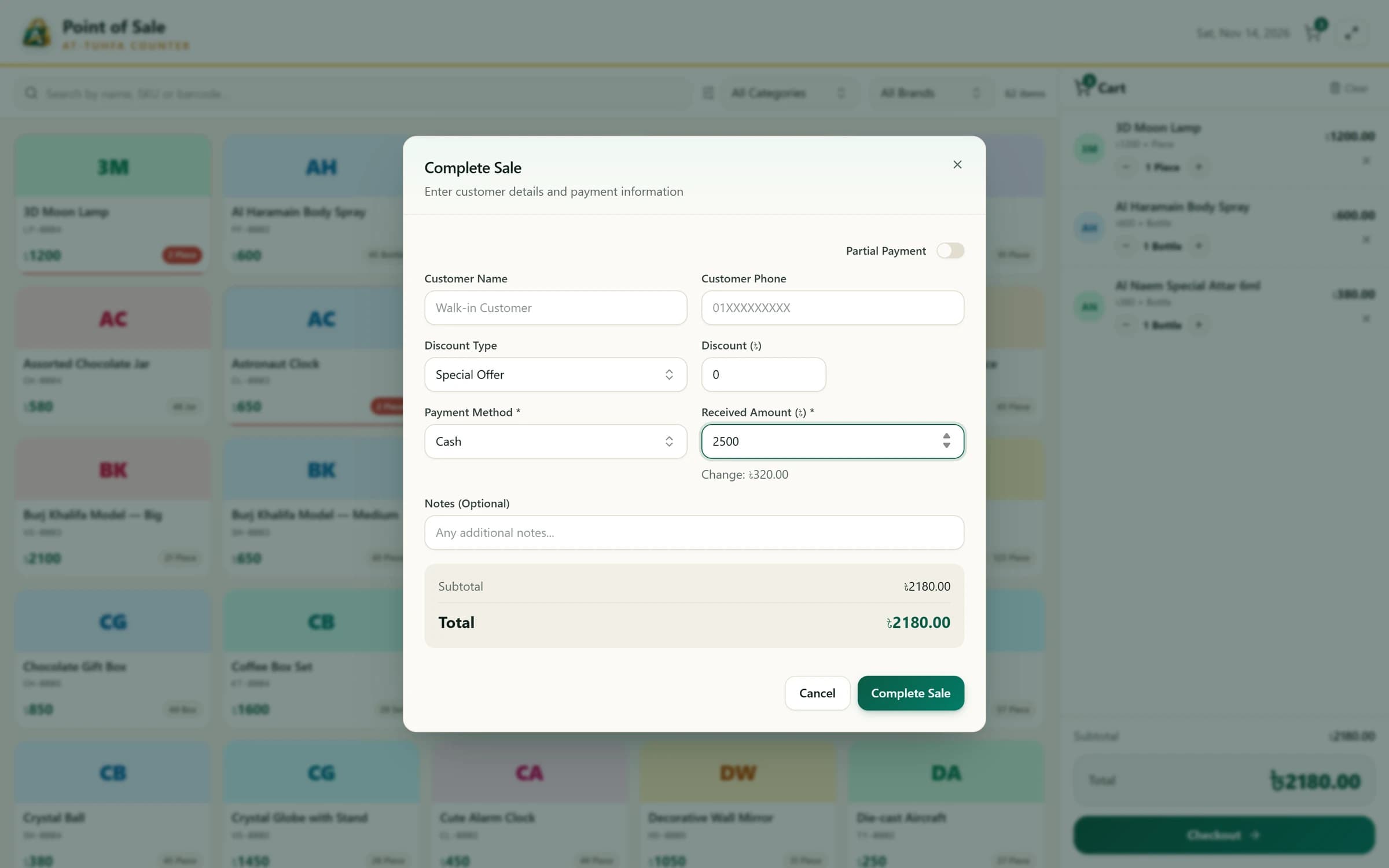
Customer details, a discount, one of five payment methods and the cash handed over, and the change is worked out. Flip Partial Payment and the balance becomes a due against the customer’s phone number.
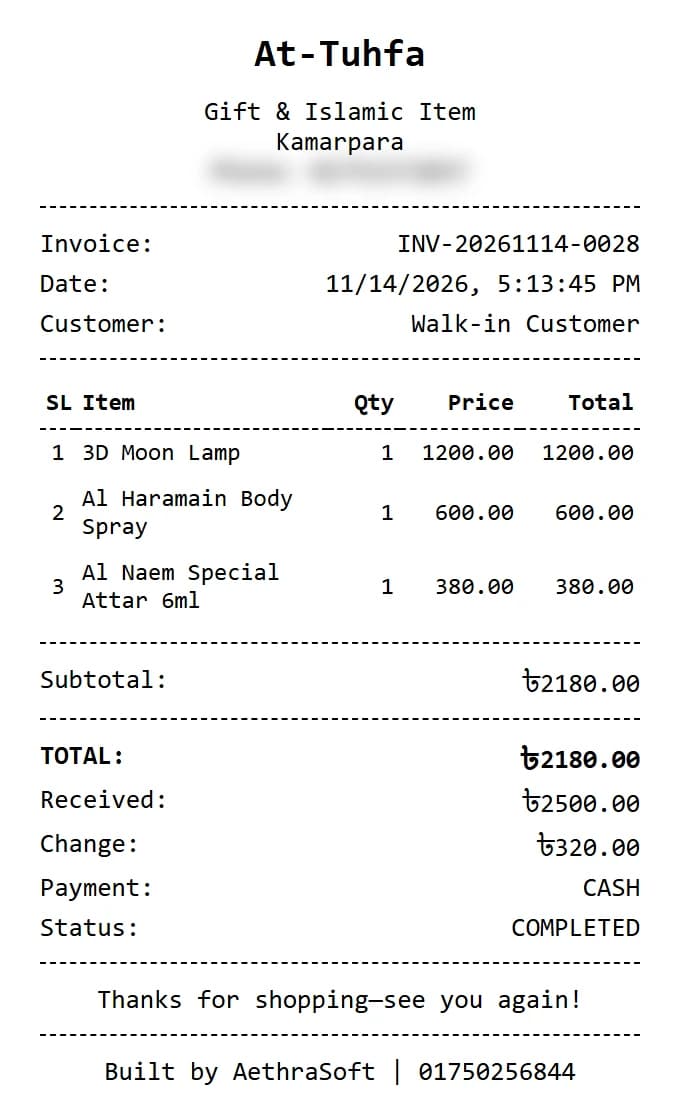
It prints the moment the sale completes, with an invoice number from a readable INV-YYYYMMDD-#### sequence. The shop’s own phone number is blurred here.
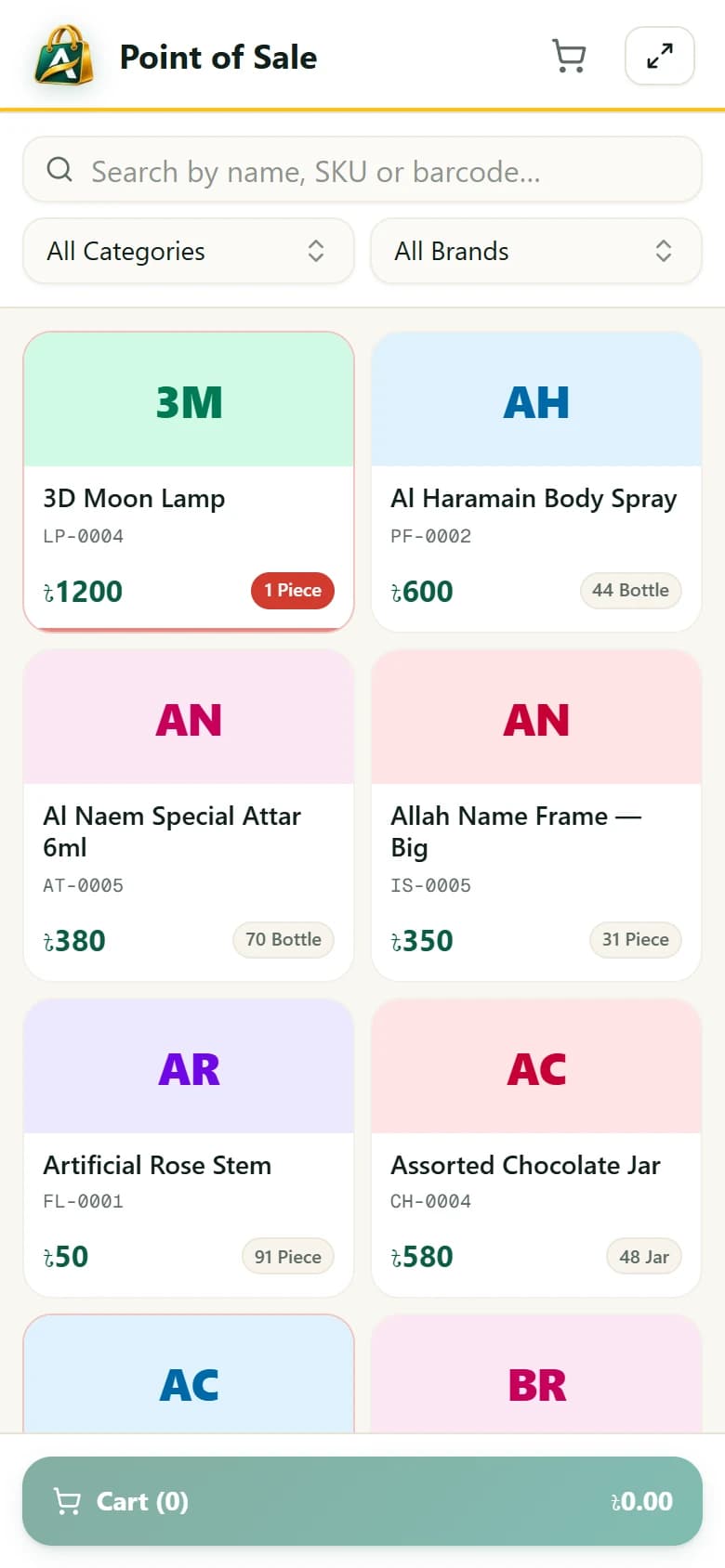
On a phone the grid reflows and the cart becomes a sheet that slides up from the bottom, because plenty of shops run the counter from a handset.
Every sale lands
in the books.
Seventeen back-office screens sit behind one sign-in. These six are the ones an owner opens first.
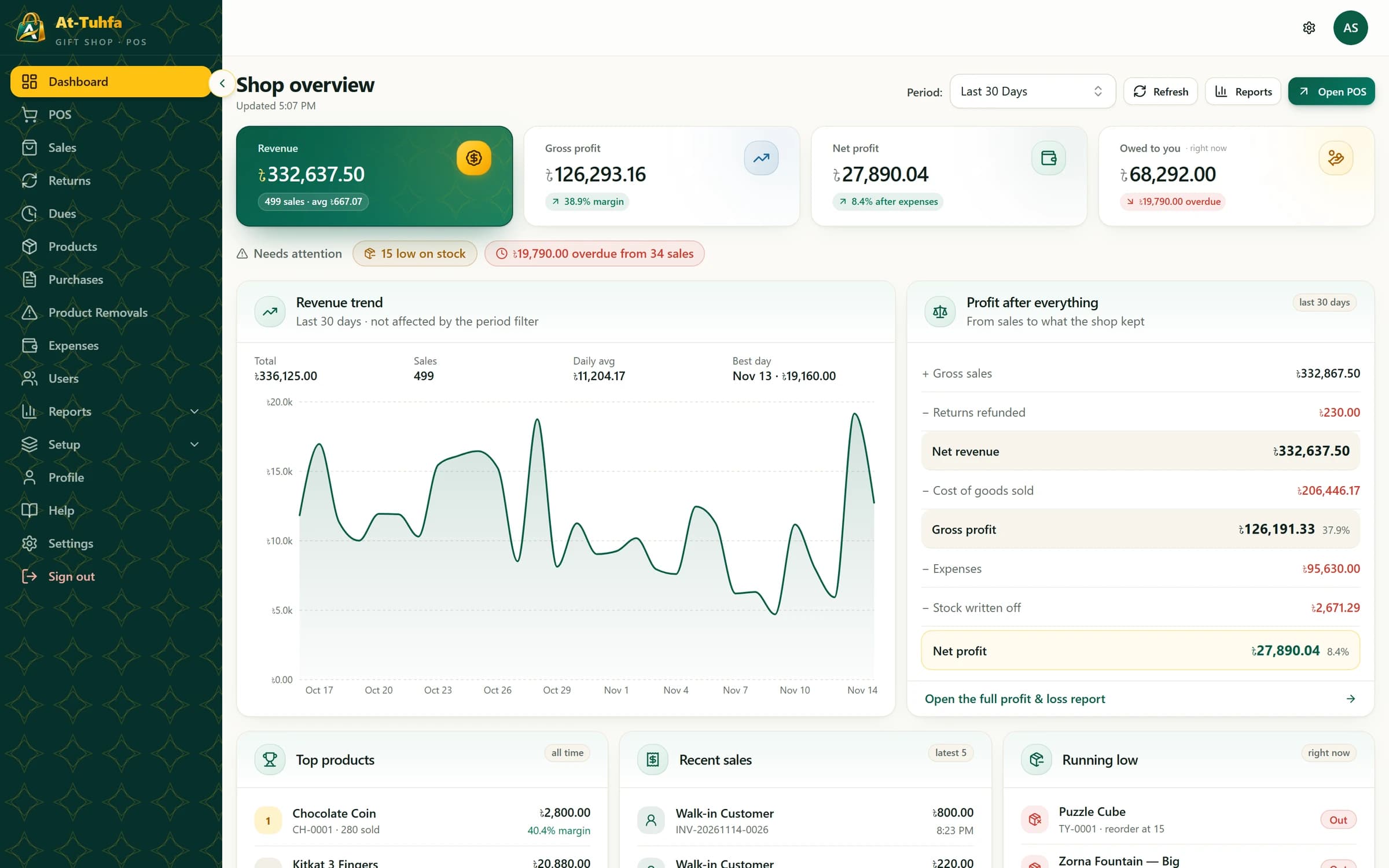
One screen answers “how are we doing?”. Revenue, gross profit, net profit and money owed sit across the top. Beneath them: a revenue trend, a profit chain from takings down to what the shop kept, the products earning their shelf space, and what is running low.
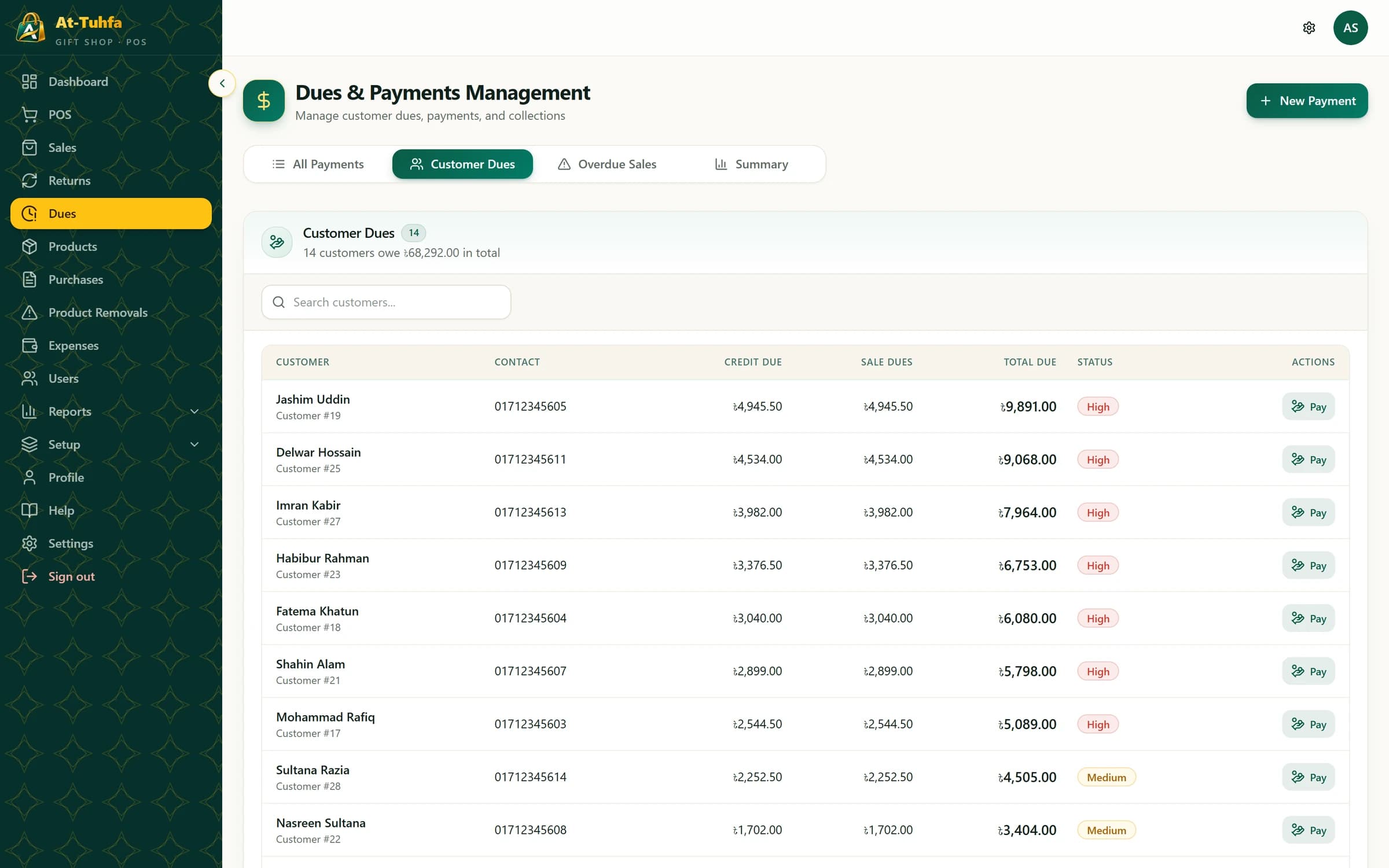
A customer is created on their first credit sale, keyed on phone number. One payment can settle several invoices, and each method asks for the reference that matters: a bKash transaction ID, a bank account, a cheque number. Every movement writes a permanent ledger line.
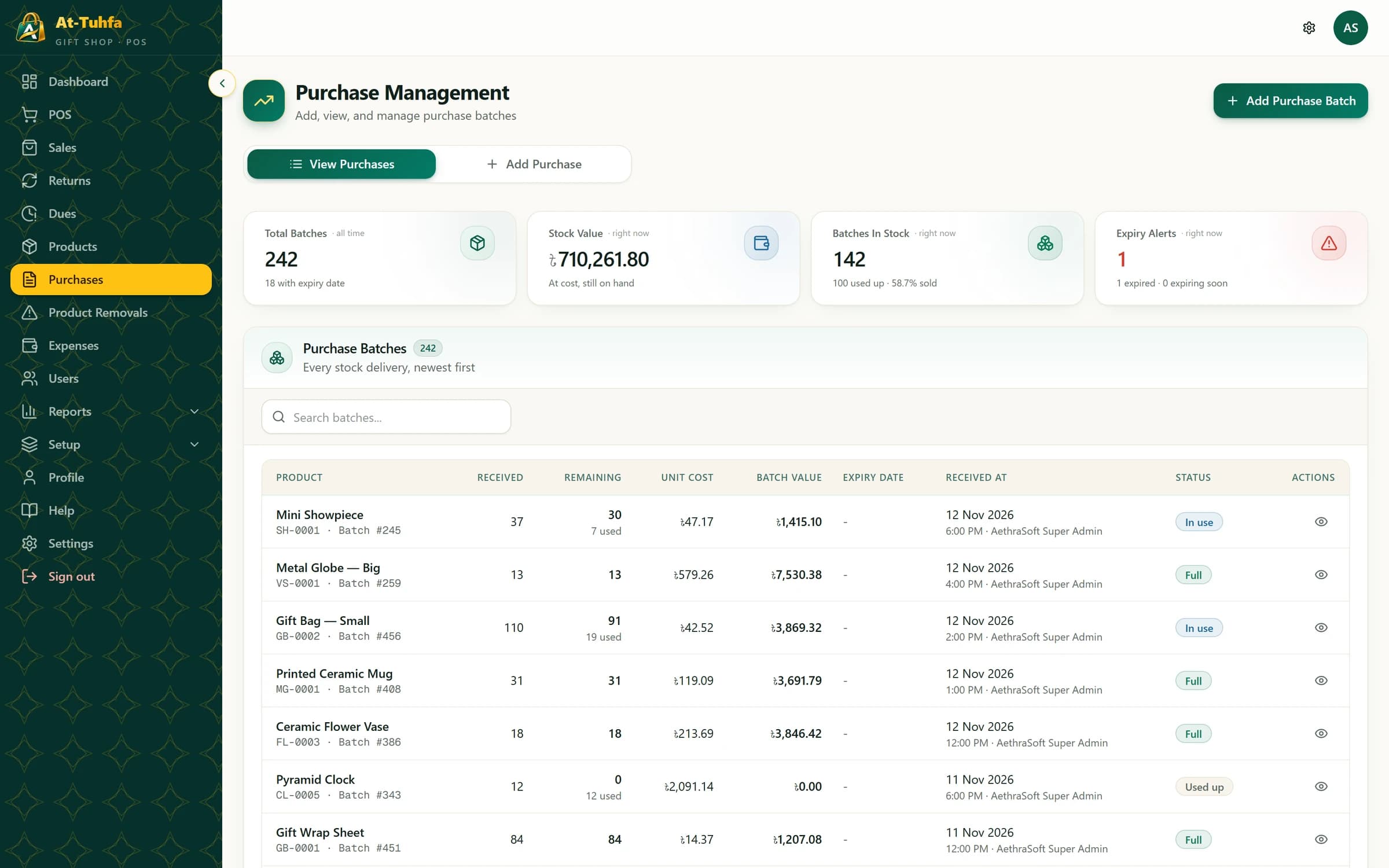
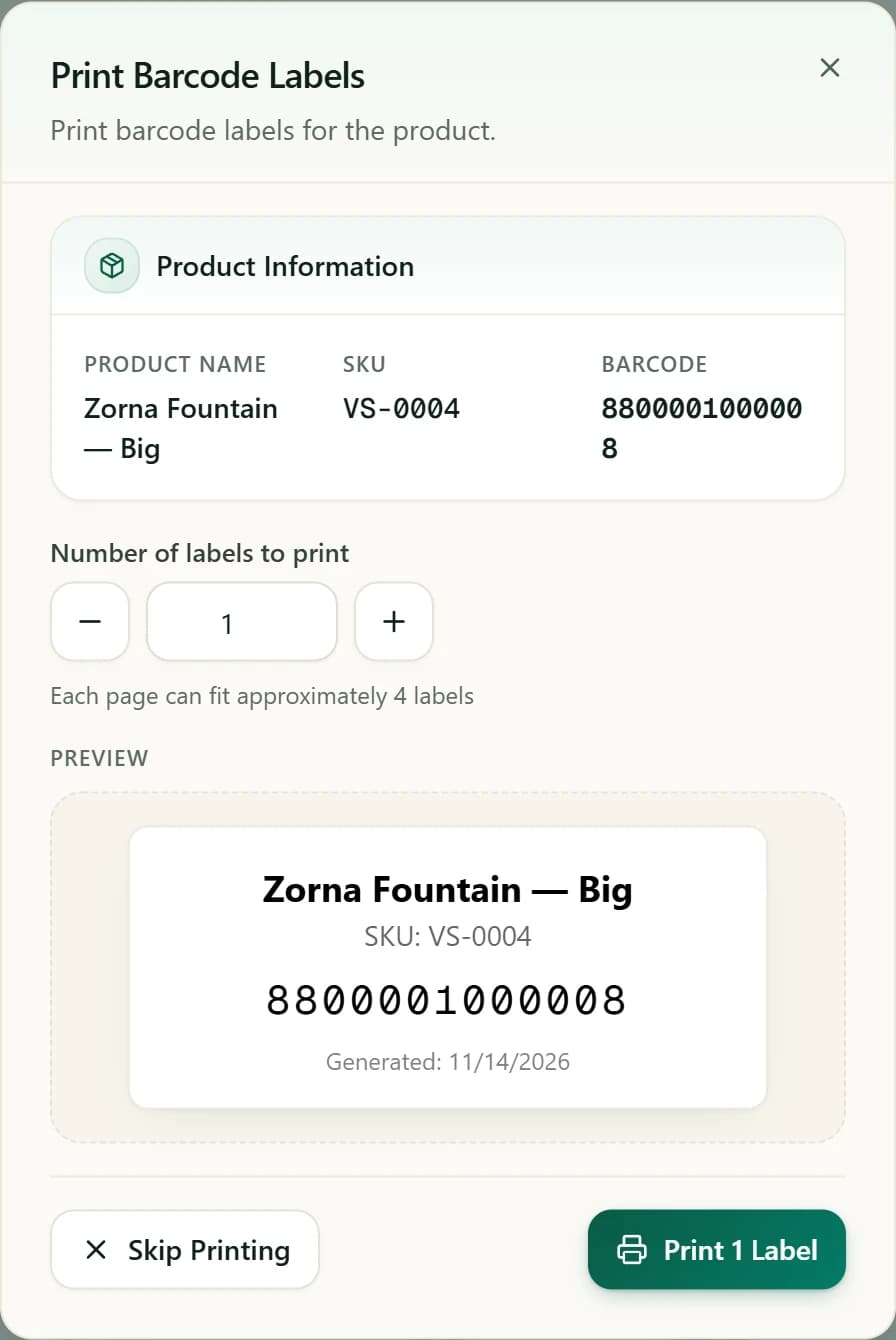
Stock arrives as costed batches, and profit is worked out at the average cost, frozen on each sale line. Barcodes are issued on save, and labels print straight from the product list. Nobody types over a stock figure: it moves only through purchases, sales, returns and removals.
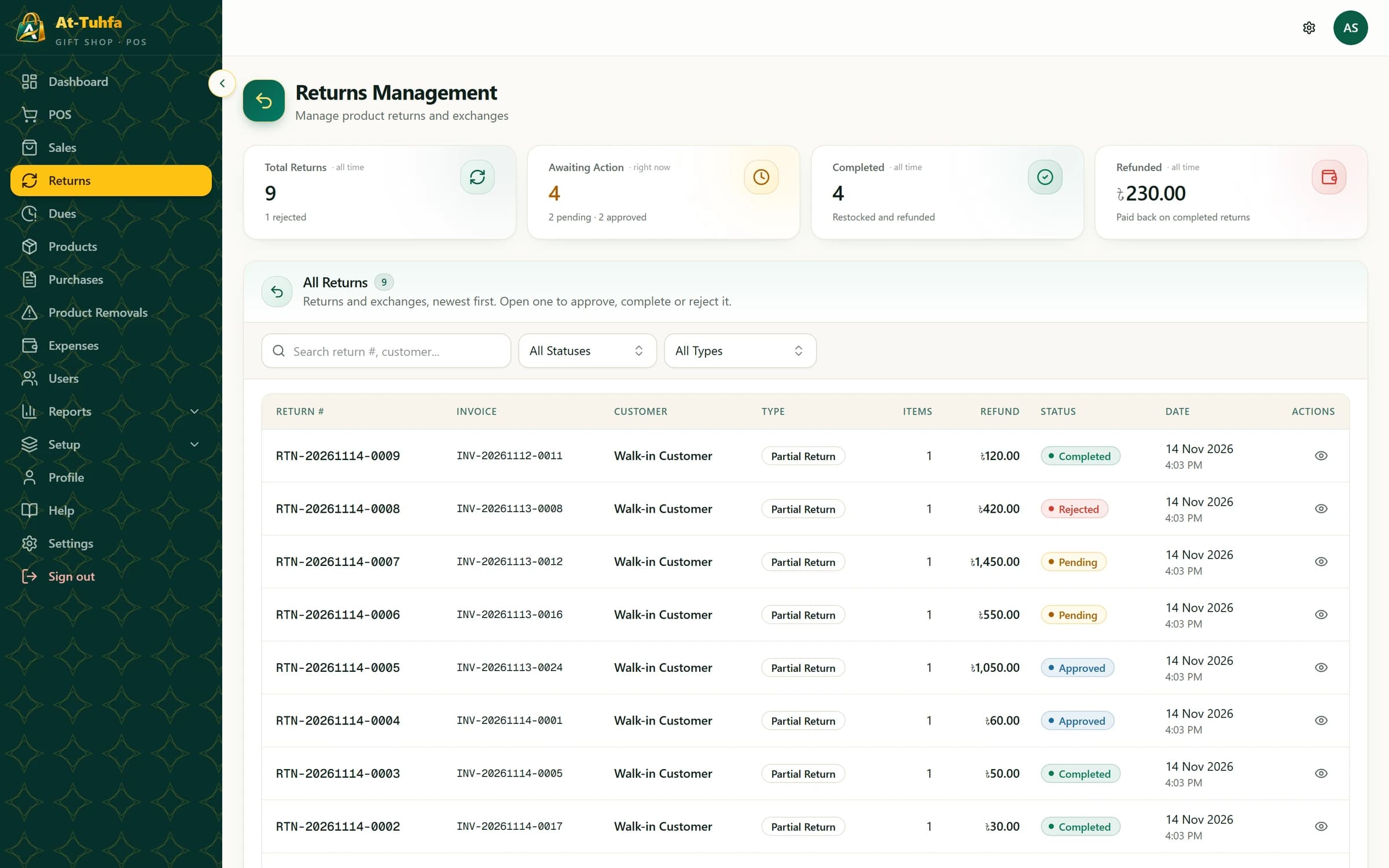
A return is a workflow, not a button: pending, approved, completed. Stock goes back on the shelf only at the last step, and the refund uses the price actually paid on the original sale, not today’s.
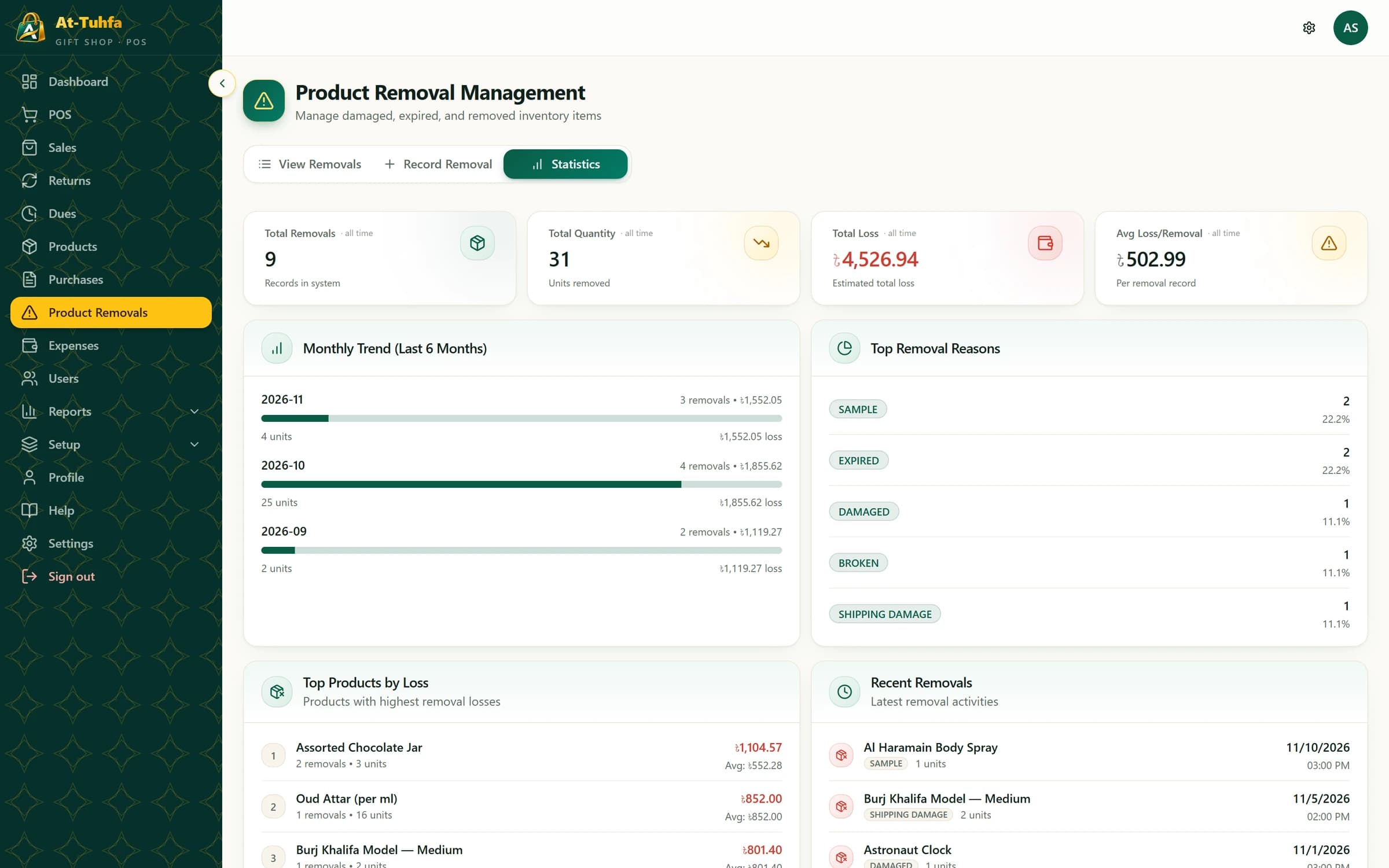
Broken showpieces, expired chocolate, attar given away as testers: twenty-one reasons, each with an estimated loss, taken off stock at once. The statistics show where the shrinkage comes from.
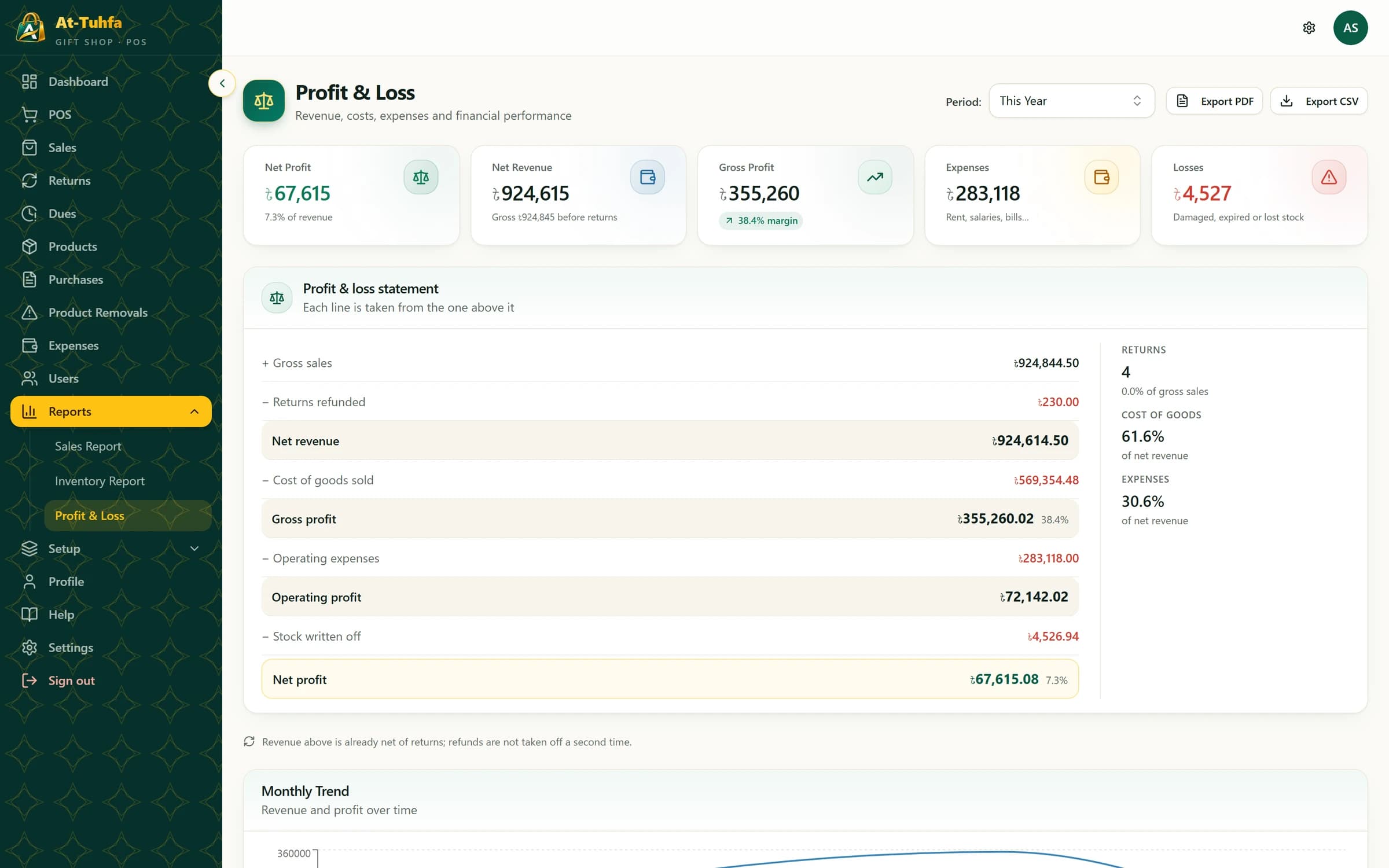
Sales, Inventory and Profit & Loss, each exportable to CSV and to a branded PDF carrying the shop’s details. Days follow Dhaka time, whatever the server’s clock is set to.
Six roles,
one editable grid.
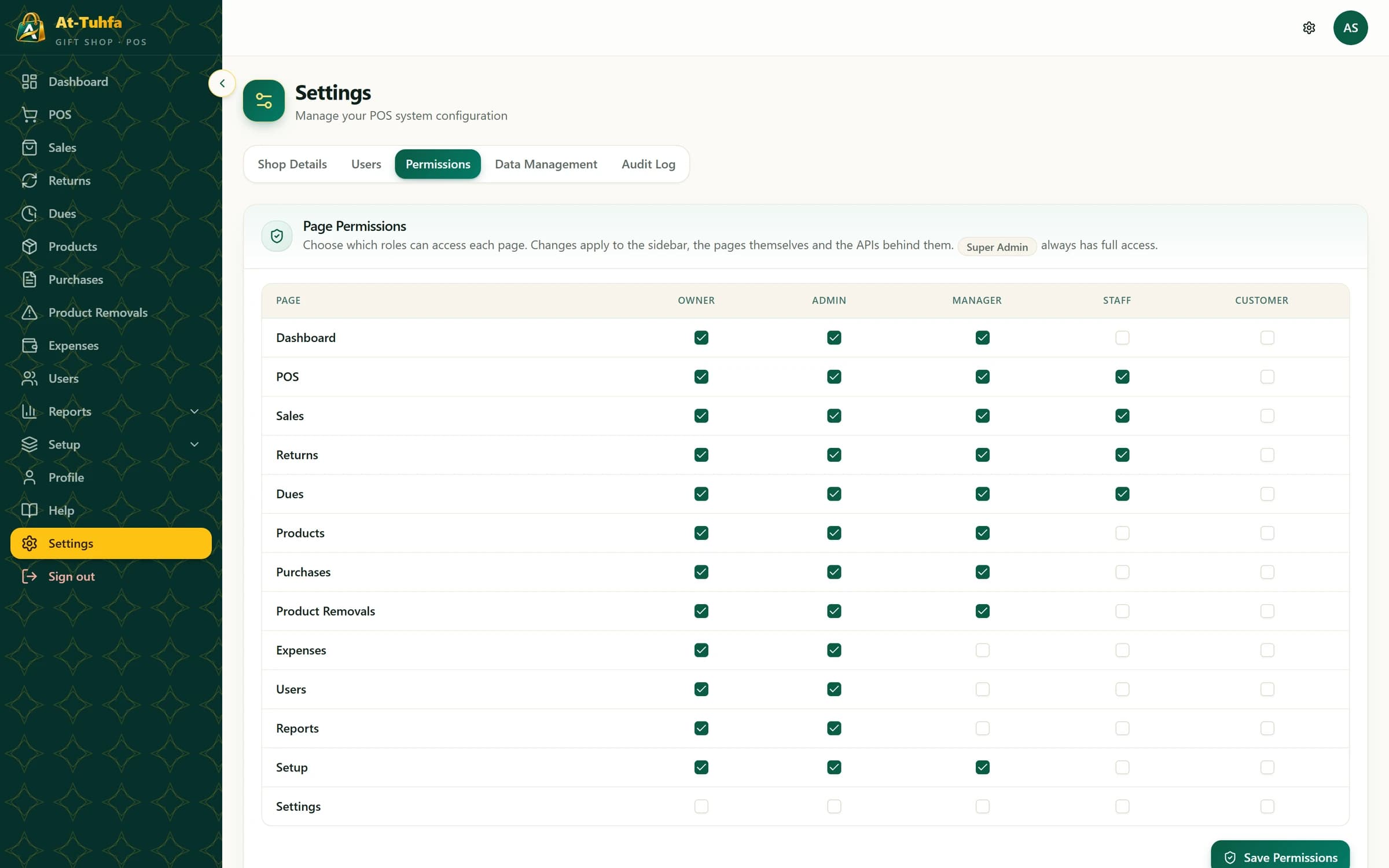
Access is not compiled in. The SuperAdmin ticks a page-by-role grid, and it takes effect on the user’s next click: in the sidebar, on the page and on the API behind it. Staff land on the till; everyone else lands on the dashboard.
- SUPERADMIN
- Administers everything, and cannot be locked out: it is deliberately not on the grid.
- OWNER
- The shop owner.
- ADMIN
- A trusted manager who also handles money and staff.
- MANAGER
- Runs the floor and the stock: products, purchases, removals and setup.
- STAFF
- The cashier: sells, takes returns and payments, and by default never sees a cost price.
- CUSTOMER
- Reserved for buyers rather than shop staff.
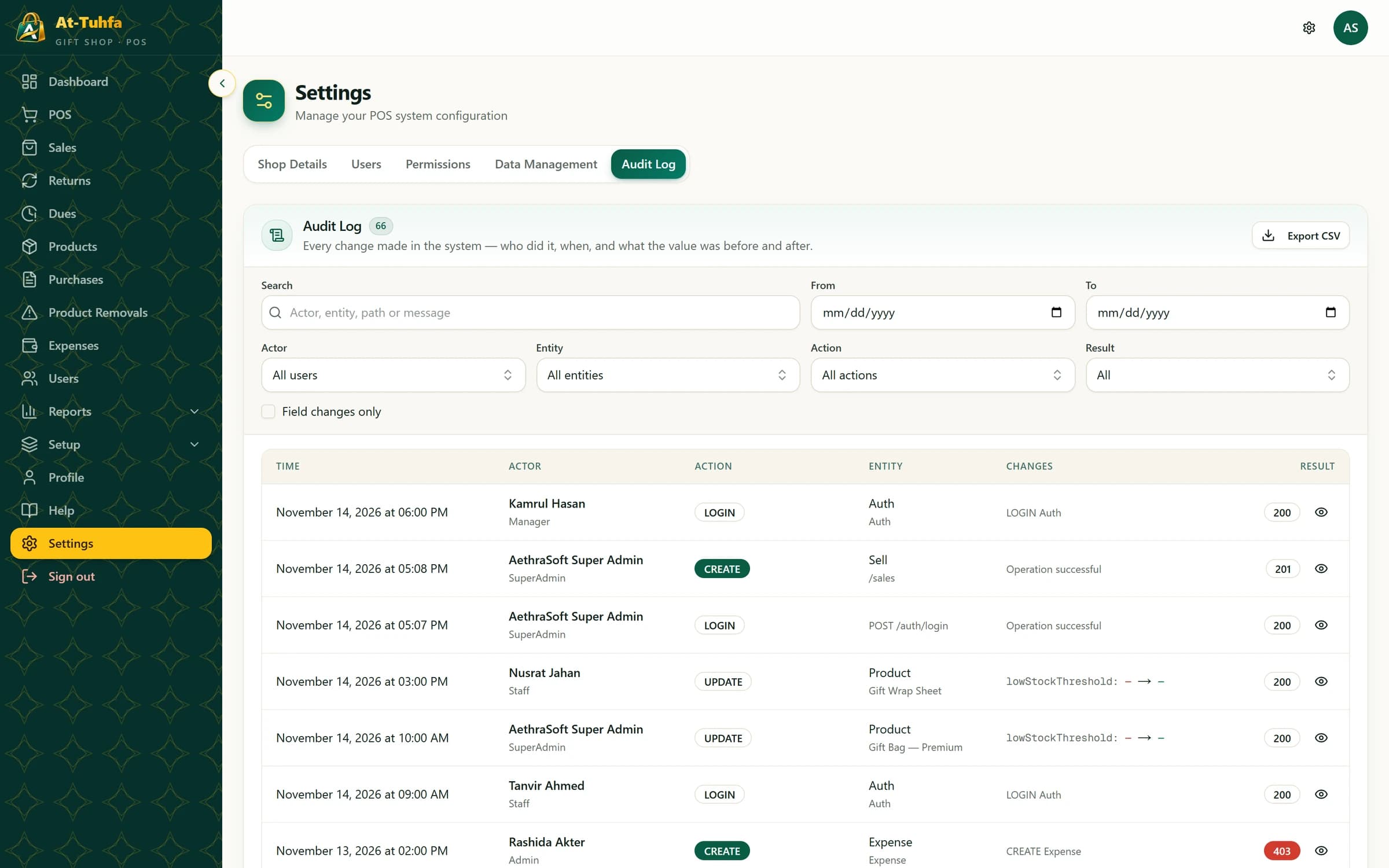
The paper trail
Every request that changes data is recorded: who, what, when, from which address, and each changed field’s value before and after. Nobody can edit or delete the log, the SuperAdmin included. Beside it, a one-click backup downloads the whole database, and a restore puts it back.
No slides.
Just the app, running.
Three silent clips, recorded straight from the demonstration shop.
One process,
one port.
The storefront and the point of sale are one Next.js and NestJS project, served by one Node process on one port. One deployment, one certificate, one log to read.
- 17 back-office screens, plus the storefront
- 16 backend service modules
- 18 database models
- 6 roles on an editable grid
- 26 selling units, whole and fractional
- 2 languages of user manual
- Permissions live in the database
One table feeds the sidebar, the route guard and the API guard, so the menu and the API can never disagree.
- Every stock change locks its rows
A sale, return or removal runs in one transaction, so two tills selling the last item at the same moment cannot both succeed.
- Numbers come from a sequence
INV-, PAY- and RTN- numbers are drawn inside the transaction that writes the document, never worked out from a row count.
- The shop’s day is Dhaka’s day
Times are stored in UTC, but “today” and every daily bucket follow Asia/Dhaka, on the server and in the browser.
- The ledger only grows
Each movement records the balance before, the change and the balance after, so a disputed due can be walked back line by line.
- The manuals are generated
Fourteen chapters in English and Bangla compile into two searchable manuals that print as a real book.
See it for yourself,
edges included.
Being straight about the edges is more useful than pretending there are none.
- Visit the storefront Browse the shop by department, occasion and budget.
- Try the POS demo The counter and the back office, running a demonstration shop.
- Read the manual Fourteen chapters, written for the people behind the counter.
- Read it in Bangla The same fourteen chapters, in Bangla.
- Download the case study A 29-page PDF with every screen in it. 6.7 MB.
What it doesn’t do yet
- Online ordering
The storefront has no cart, payment or delivery. It is for discovery and a visit to the shop.
- Tax at checkout
A tax rate is stored in Settings, but it is not applied to a sale.
- Reprinting a receipt
It prints once, when the sale completes.
- Password reset
An administrator sets passwords; there is no self-service reset.

Have something
worth building?
Tell us what it has to do, and what happens if it fails. We'll take it from there.
- 01A person reads it
Not a routing queue and not an auto-responder. Someone who could work on it reads it first.
- 02We reply within two days
From aethrasoft@gmail.com, on working days, with a real answer rather than a calendar link.
- 03Or we point elsewhere
If we are not the right team for it, we say so and suggest who might be. That costs us nothing.